
How to Structure Your Website for SEO: How to Create Your SEO Web Architecture
SEO web architecture is a fundamental concept for any digital project aiming for good search engine ranking.
Understanding how to structure your website for SEO is key to improving user experience and making it easier for search engines to crawl and link your content.
In this article, I will explain how to create an effective SEO web architecture and optimize your website to achieve better results in search engine rankings.
What is SEO Web Architecture?
SEO web planning refers to how you organize and structure your website’s content to facilitate its examination by search engines and improve the user experience.
A good website organization helps make your web page URLs more accessible and understandable for both users and search providers.
A well-designed web architecture should consider URL design, navigation, internal links, and content distribution. All of this contributes to an optimized website and enhances the site’s SEO.
Subscribe to OnlyNiches.NET from just €30/month and start scaling your website today.
Importance of SEO Web Architecture
Having a good SEO web architecture is crucial for the success of your website. Here are some key benefits:
- Improves User Experience (UX): A clear and logical site organization makes navigation easier, allowing users to find what they are looking for quickly.
- Optimizes Crawling and Indexing: Search providers can crawl and index your website more efficiently, thereby improving your ranking.
- Increases Time on Site: A good design encourages users to explore more pages, reducing the bounce rate.
- Facilitates SEO Implementation: A well-designed architecture allows for better implementation of keywords and internal links, enhancing your ranking strategy.
Types of SEO Web Architecture
There are different types of web architecture you can use depending on the nature and goals of your website. The two main types are:
Horizontal Architecture
Horizontal architecture implies that all pages are at a similar level, meaning there are not many subcategories.
This type of architecture is ideal for small websites with limited content.
In a site with this architecture, links between different sections are usually at the top of the page, allowing users to navigate easily and directly.
Additionally, this type of organization facilitates the search for information and the understanding of the site’s structure.
It can also be beneficial for search engine optimization because having fewer levels of depth makes search engine crawling more efficient, potentially improving search rankings.
However, it’s important to note that horizontal architecture can limit organization and the ability to expand the site in the future.
If the site grows and more content needs to be added, maintaining horizontal planning without losing clarity and coherence in navigation can become challenging.
In summary, horizontal structure is a good option for small sites with limited content, but it’s important to consider long-term expansion and organizational needs when choosing this type of design.
Vertical Architecture
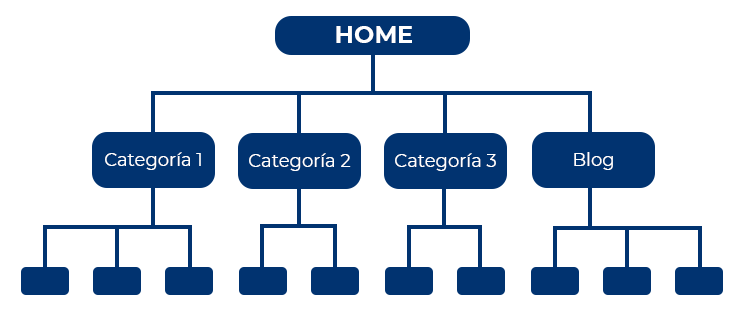
In vertical architecture, pages are organized into multiple layers or levels of depth, with categories and subcategories.
This SEO web architecture is ideal for large websites, such as e-commerce sites or blogs with a lot of content.
Vertical architecture allows users to navigate easily and quickly through different sections and subsections, making it easier to find specific information.
For example, in an e-commerce site, users can filter products by categories, brands, prices, etc., in a straightforward manner.
Moreover, this type of architecture favors search engine optimization because it allows for better content organization and hierarchy, which in turn enhances the user experience.
In summary, vertical organization is an effective way to organize large amounts of information clearly and accessibly for users, resulting in a better browsing experience and greater efficiency in finding information.
Mixed Architecture
A combination of the two previous types, where some sections of the website have a horizontal structure and others a vertical structure.
This can be useful for websites that are constantly growing and evolving.
For example, a company website offering various services could have a vertical organization on the homepage to clearly and concisely present each of the services offered.
However, in the news or blog section, it could opt for a horizontal layout to display a larger amount of content in a visually appealing way.
This mixed strategy allows for adaptation to the changing needs of the website, providing greater flexibility in presenting information and a more dynamic user experience.
Additionally, by combining both styles of architecture, you can leverage the best of each to create a more complete and functional website.
How to Create SEO Web Architecture
1. Initial Planning
Before starting to design your website, it is crucial to plan. This includes understanding your goals, the type of content you will have, and how it will be organized. Here are some steps to follow:
- Define Goals: Clarify what you want to achieve with your website.
- Identify Keywords: Conduct keyword research to understand what your users are searching for and how you can improve your content.
- Analyze Competitors: Observe how your competitors’ websites are organized.
2. Create a Sitemap
A sitemap is a visual representation of your website’s design. It helps you visualize how different pages and subcategories interrelate. A sitemap also facilitates user navigation through the website by providing an overview of all available entries and pages and how to access them.
To create a sitemap, you can follow these steps:
- List all the main pages of your website, such as the homepage, product page, services page, contact page, etc.
- Organize the pages into categories or sections, depending on their content and purpose. For example, all product-related pages can be grouped into a “Products” section.
- Draw a diagram that shows the hierarchical distribution of your website, with the main pages at the top and the subpages below them.
- Connect the pages with lines to show how they relate to each other. For example, the product page can be linked to individual product pages.
- Include links to all internal entries and pages of your website, as well as external links if necessary.
- Review and adjust your sitemap to ensure it accurately reflects your website’s configuration and is easy to understand.
3. URL Structure for Good Architecture
A consistent and clean URL structure is essential. URLs should be descriptive and contain relevant keywords. Avoid long and complicated URLs.
Example of a consistent and clean URL:
https://www.example.com/category/productWhere “category” could be the type of product or service and “product” would be the specific product name.
Avoid hyperlinks like:
https://www.example.com/p=123&cat=4&subcat=7&product=3456
Which are confusing and hard for visitors to understand, and do not provide relevant information for search engines.
4. Internal Links
Internal links are crucial for good web distribution. They help distribute page authority and improve the crawling of your website by search providers. Ensure that each page is linked from other relevant pages.
Some strategies to improve your internal links include:
- Use descriptive and relevant anchor text: The anchor text is the visible text in a hyperlink. It is important to use relevant keywords that clearly describe the content of the page you are linking to.
- Link to relevant pages: Ensure to link to pages that are relevant and complementary to each other. This will help search engines understand the relationship between the pages and improve the user experience.
- Use links within content: Linking to other pages within your posts is a good practice to improve your website’s navigability.
- Create a sitemap: A sitemap is a list of all the pages on your website that facilitates navigation for search engines and users.
- Regularly review internal links: It is important to periodically review your website’s internal links to ensure they work correctly and direct users to the correct pages.
5. Organization of Categories and Subcategories
The organization of categories and subcategories should be logical and clear. This not only facilitates navigation but also helps search providers understand the hierarchy and relationship between pages.
Some recommendations for effectively organizing categories include:
- Hierarchy: Organize categories hierarchically so that subcategories are clearly related to the main category.
- Clear and concise naming: Use descriptive and easy-to-understand names for each category.
- Limit the number of levels: Try not to exceed more than three levels to avoid confusion and complications in navigation.
- Use keywords: Include relevant keywords in the names of sections and subsections to improve visibility in search engines.
- Consistency: Maintain a consistent structure throughout your website to facilitate navigation and understanding of information.
6. Quality Content for Your Web Structure
The content of your website should be high quality and relevant to your users. Ensure to include keywords naturally and provide value to your visitors.
Additionally, it is important to regularly update the content to keep users interested and improve your search engine positioning. Use images, videos, and other visual elements to make the content more attractive and easy to consume.
Make sure your content is unique and original, avoiding copying from other websites. This not only helps establish your authority in your niche but also protects you from potential penalties from search engines.
Remember to optimize your content for mobile devices, as more and more users access the internet via smartphones or tablets. This will ensure a satisfactory user experience and improve your website’s visibility in search results.
7. Mobile Optimization
With the growing use of mobile devices, it is essential that your website is designed for mobile. An SEO web structure should be responsive and offer a good user experience on any device.
This means your website should load quickly on mobile devices, have a design that adapts to smaller screens, and be easy to navigate with touch gestures. It is also important to optimize images and content for mobile, ensuring they display correctly and do not negatively affect loading speed.
Additionally, ensure your website’s content is easily accessible and readable on mobile devices. Use a clean and minimalist design, avoid intrusive pop-ups, and ensure buttons and links are large enough and easy to click with fingers.
In summary, optimizing your website for mobile devices will not only improve the user experience but also help improve your visibility in search results, as Google and other search providers prioritize mobile-friendly websites in their rankings.
Don’t underestimate the importance of mobile optimization in your ranking strategy!
Subscribe to OnlyNiches.NET from just €30/month and start scaling your website today.
Best Practices for SEO Architecture
Use a Flat Architecture
A flat architecture means that important pages are only a few clicks away from the homepage. This facilitates crawling and indexing by search engines and improves the user experience.
To implement this type of architecture on a website, follow these steps:
- Identify the most important pages on the website, such as the homepage, main product or service pages, and other key pages like the contact or testimonial pages.
- Organize these pages so that they are just a couple of clicks away from the homepage. This can be achieved through a clear and well-designed navigation menu highlighting the most important pages.
- Use strategic internal links to connect the pages and facilitate user navigation. For example, include links in the footer or within page texts that direct users to other relevant sections of the site.
- Avoid orphan pages, which are pages that can only be accessed through external links or internal search. All important entries should be coherently linked to each other.
- Improve page load times to ensure a smooth user experience. A flat architecture facilitates fast page loading as it doesn’t require users to click multiple times to access the information they seek.
By following these steps and maintaining this architecture on the website, the accessibility of key pages will improve for both users and search engines, contributing to better positioning and visibility on the internet.
Implement Breadcrumbs
Breadcrumbs are a form of secondary navigation that helps users understand where they are on your website and easily return to previous pages. This also helps search engines understand your site’s structure.
Maintain a Consistent Link Structure
Ensure that your internal links are consistent and relevant. Use descriptive anchor texts that contain keywords.
Optimize Loading Speed
The loading speed of your website is a crucial factor for ranking. A slow website can negatively impact the user experience and your search engine ranking.
Here are some strategies to improve your website’s loading speed:
- Reduce image sizes: Large, heavy images can slow down your website’s loading speed. Use image compression tools to reduce their size without compromising quality.
- Minimize the use of scripts and plugins: Unnecessary scripts and plugins can increase your website’s load time. Review and remove those that are not essential for its functionality.
- Use a caching system: Caching helps temporarily store static files of your website, allowing for faster loading for users who visit your site frequently.
- Reduce code: Eliminate whitespace, comments, and redundant lines of code to reduce the size of HTML, CSS, and JavaScript files.
- Use a fast and reliable server: Ensure your website is hosted on a high-quality server with good responsiveness.
- Avoid unnecessary redirects: Redirects can increase your website’s load time. Use them only when strictly necessary.
- Regularly test loading speed: Use tools like Google PageSpeed Insights or GTmetrix to run tests and detect potential areas for improvement in your website’s loading speed.
Improving your website’s loading speed will not only enhance the user experience but also increase your chances of appearing in top search results. Follow these tips and see how your website’s performance improves!
Conduct SEO Audits
Conducting regular audits will help you identify and fix issues in your web architecture. Tools like Google Search Console, Ahrefs, SEMrush, and OnlyNiches.NET can be very useful.
SEO audits will allow you to detect potential errors on your website that could be affecting your search engine ranking.
Some aspects to analyze during an SEO audit include:
- Indexing of your website: Ensure all your pages are correctly indexed by search engines.
- Structure of your website: Verify that your website’s structure is clear and easy to navigate for both users and search engines.
- Content of your website: Review the quality and relevance of your website’s content, ensuring it is designed for keywords relevant to your business.
- Technical performance of your website: Analyze technical aspects such as loading speed, security, and mobile compatibility.
By conducting regular SEO audits, you can identify opportunities to improve your search engine ranking and increase organic traffic to your website.
Additionally, you can keep your website updated and adapted to the constant changes in search engine algorithms.
Conclusion
Creating an effective SEO web architecture is essential for the success of your website. It not only enhances the user experience but also facilitates the work of search engines in crawling and linking your content. By following best practices and continuously improving, you can boost your ranking and attract more traffic to your site.
Remember, good web architecture is not a one-time task. It requires constant attention and adjustments to ensure that your website is always optimized and ready to meet the changes in search engine algorithms and the needs of your users.
Get started and begin improving your website’s architecture today!

Eduardo Medina
Eduardo Medina es programador y SEO, con más de 20 años de experiencia en ambos campos. Desde 2024 escribe post para OnlyNiches.NET en el que enseña a los usuarios a posicionar su web y su marca en los motores de búsqueda y redes sociales. En un mundo tan cambiante, hay que estar siempre aprendiendo y reinventándose.


Leave a Reply
Want to join the discussion?Feel free to contribute!