

What is the Hreflang Tag and How to Use It in an SEO Strategy?
In the world of SEO, especially when it comes to international SEO, the hreflang attribute plays a crucial role.
If you have a website with content in multiple languages or targeting different regions, you need to understand what the hreflang tag is and how to implement it correctly.
In this article, I will guide you step by step on how to use this powerful tool to improve your website’s ranking in search engines like Google.
What is Hreflang?
The hreflang tag is an HTML attribute that indicates to search engines the language and region of a specific webpage.
This tag helps Google and other search engines show the appropriate version of your page to users based on their language and location.
What is the Hreflang Tag Used For?
The hreflang tag is essential for avoiding duplicate content issues in different languages and ensuring that users see the most relevant version of your website, preventing them from seeing incorrect content.
Additionally, it improves the bounce rate and user experience by directing users to the correct page.
Subscribe to OnlyNiches.NET for as little as €30/month and start scaling your website today.
How to Implement the Hreflang Tag
Hreflang Attribute Format
The basic syntax of an hreflang tag is as follows:
<link rel="alternate" hreflang="es" href="http://example.com/es/" /><link rel="alternate" hreflang="en" href="http://example.com/en/" />
rel="alternate": Indicates that this is an alternate version of the page.
hreflang="es": The language code in ISO 639-1 format.
href="http://example.com/es/": The URL of the page in that language.
Implementing Hreflang in the HTML Head
The most common way to implement the hreflang tag is through the HTML head of each page, similar to other attributes like the canonical tag. You can do this for the same language or different languages.
Adding an hreflang tag is simple; here’s an example:
<head>
<link rel="alternate" hreflang="es" href="http://example.com/es/" />
<link rel="alternate" hreflang="en" href="http://example.com/en/" />
</head>
As you can see, there is an attribute for each language version.
Implementing Hreflang via the XML Sitemap
You can also implement hreflang tags in your sitemap, which is useful for large websites with many URLs and versions in different languages.
<url>
<loc>http://example.com/es/</loc>
  <xhtml:link rel="alternate" hreflang="es" href="http://example.com/es/" />

<xhtml:link rel="alternate" hreflang="en" href="http://example.com/en/" />
</url>
Implementing Hreflang in the HTTP Header
Another option is to implement hreflang in the HTTP header of the server responses. Here’s an example of how this would look:
Link: <http://example.com/es/>; rel="alternate"; hreflang="es"
Link: <http://example.com/en/>; rel="alternate"; hreflang="en"
Implementing the hreflang tag correctly can significantly enhance your website’s SEO, particularly for international audiences, by ensuring that users see the right version of your content.

Hreflang x-default
The x-default attribute is used to indicate the page that should be displayed when there is no exact match for the user’s language or region. This is useful when you want to have a generic landing page.
<enlace rel=”alternativo” hreflang=”x-default” href=”http://example.com/” />
Common Hreflang Errors
Lack of Self-Referencing
Each page must include a reference to itself. This means that if you have a page in Spanish, that page must have an hreflang tag pointing to its own URL.
If you do not include this self-reference, search engines may have difficulty understanding the relationship between the different versions of your page in different languages.
This can affect your ranking in search results and make it harder for users to find your content.
Make sure to include the hreflang tag on each version of your page in different languages and point to the corresponding URL in each case.
This will help search engines understand the relationship between the different versions of your page and improve your online visibility.
Inconsistency in Language Codes
It is crucial to use the correct language code format (ISO 639-1) and the country code (ISO 3166-1) when necessary.
For example, if you are referring to the Spanish language, the correct language code is “es” according to ISO 639-1, and the country code for Spain would be “ES” according to ISO 3166-1.
If an incorrect language code is used, such as “sp” instead of “es”, it could cause confusion or errors in the interpretation of the information by users or systems using it.
It is important to be consistent and precise when using language and country codes in any application, document, or communication to ensure correct understanding and functionality.
Not Implementing on All Pages of Your Website
You must ensure that all pages of your site that have versions in multiple languages include the corresponding hreflang tags.
However, it is important to note that it is not necessary to implement these tags on all pages of your website.
Instead, you should use them on those pages that have versions in different languages and are relevant to the target audience.
Implementing the hreflang attribute on all pages may be unnecessary and complicate the management of your website.
It is better to focus on those pages that need this tag to ensure that users find the correct version according to their language and location.
Therefore, make sure to carefully analyze your website and determine on which pages it is really necessary to implement hreflang tags.
This will help you optimize your site for an international audience without unnecessarily complicating its management.
Verification in Google Search Console
Once you have implemented the hreflang tags, it is important to verify that everything is working correctly. Google Search Console offers tools to check that the tags are configured properly and that there are no errors.
To verify the hreflang tags in Google Search Console, follow these steps:
- Log in to your Google Search Console account.
- Select the website you want to verify.
- In the left-hand navigation panel, go to “HTML Improvements” and then select “Hreflang Tags”.
- Here you will see a list of all the hreflang tags found on your site. Check that the tags are configured correctly and that there are no errors.
- If you find any issues, such as improperly formatted or missing hreflang tags, correct them on your website and request a recheck to ensure the issue is resolved.
Verifying hreflang tags in Google Search Console will help ensure that your site is properly optimized for international audiences and that users receive the correct version of the content depending on their location and language.
International Marketing Strategy with Hreflang
Improving International SEO
Implementing hreflang is fundamental for any international SEO strategy. It allows you to direct relevant traffic to the correct version of your site, improving user experience and ultimately your positioning in search engines.
Another important aspect of improving international SEO is ensuring you have high-quality, relevant content for each target market. This includes translating keywords and specific terms for each language and adapting content to be culturally relevant for each audience.
Additionally, it is crucial to optimize the loading speed of your website in all the countries where you want to have a presence. Users in different parts of the world have varying internet connection speeds, so it is important to ensure a fast and efficient user experience in all markets.
Another important strategy is working on building international links. This involves collaborating with local, relevant websites in each target market to increase your site’s authority in those countries and improve your search engine rankings.
Finally, it is important to constantly monitor your performance in different international markets using tools like Google Analytics to analyze traffic, conversions, and other key metrics. This will allow you to adjust your international SEO strategy and continually optimize your efforts to achieve the best results.
Reducing Duplicate Content
By indicating to Google which is the appropriate version of each page for different languages and regions, you significantly reduce the risk of duplicate content, which can negatively affect your SEO.
Therefore, it is important to use hreflang tags on your site to indicate to search engines which is the valid version of the page for each language and region.
Additionally, make sure to correctly redirect alternative versions of your page to the main version to prevent them from being considered duplicate content.
Another way to reduce duplicate content is through optimizing your site’s structure, avoiding the creation of multiple URLs for the same page, and using 301 redirects correctly.
You can also use the canonical tag to indicate to search engines which is the preferred URL for a particular page, especially useful if you have similar content on different pages of your site.
In summary, reducing duplicate content on your website is crucial for improving your SEO and ensuring that the correct versions of your pages are indexed and properly ranked in search engines.
Increasing Conversion Rate
By providing users with the version of your site in their preferred language, you improve the conversion rate, as users feel more comfortable and understand your content better.
Additionally, ensure that your website is easy to use and navigate, with an attractive and responsive design. This will help users stay on your site longer and increase the likelihood of them taking a desired action, such as making a purchase or completing a contact form.
Another aspect to consider is optimizing the loading speed of your website. Users will not wait long for a page to load, so it is important to maintain a fast loading time to prevent them from leaving for another site.
Use clear and attractive calls to action on your website to guide users towards the action you want them to take. This can include “buy now” or “sign up here” buttons that are visible and easy to find on your site.
Finally, gather data on user behavior on your website using web analytics tools. This will help you identify areas for improvement and make adjustments to further increase your site’s conversion rate.
Follow these tips, and you’ll see your conversion rate start to rise!
Verifying hreflang tags in Google Search Console will help ensure that your site is properly optimized for international audiences and that users receive the correct version of the content depending on their location and language.
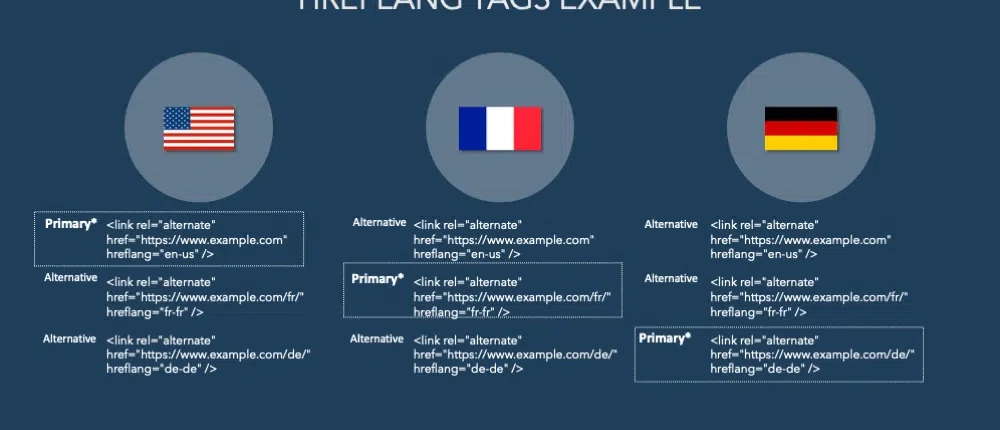
Practical Cases and Examples
Multilingual E-commerce Site
Imagine you have an e-commerce site with versions in English, Spanish, and French. Correct implementation of hreflang tags will ensure that users see products, prices, and descriptions in their preferred language, enhancing their shopping experience.
International Blog
If you manage a blog with content in multiple languages, hreflang tags will help direct users to the versions of your articles in their language, increasing reader retention and reducing the bounce rate.
Hreflang is an HTML attribute that tells search engines which version of a web page to show to users who speak a certain language.
This is useful when you have an international blog with content in multiple languages, as it allows you to direct traffic to the correct version of your site based on users’ location and language preferences.
To implement hreflang tags on your website, you first need to identify the different language versions of your pages.
For example, if you have a blog in English and Spanish, you will need to specify which version of each article corresponds to each language.
This is done by adding a hreflang tag in the header section of each page.
Conclusion
The hreflang tag is a powerful tool for any international SEO strategy. It ensures that search engines display the correct version of your content to users, improving user experience and your positioning in search results.
Through careful implementation and verification in Google Search Console, you can avoid common errors and maximize the benefits of this tag.
Implement hreflang on your website and watch your international SEO and user satisfaction improve. If you still have questions or need help implementing these tags, do not hesitate to seek professional advice to ensure everything is configured correctly.

Eduardo Medina
Eduardo Medina es programador y SEO, con más de 20 años de experiencia en ambos campos. Desde 2024 escribe post para OnlyNiches.NET en el que enseña a los usuarios a posicionar su web y su marca en los motores de búsqueda y redes sociales. En un mundo tan cambiante, hay que estar siempre aprendiendo y reinventándose.


Leave a Reply
Want to join the discussion?Feel free to contribute!